

Halo, kalau kamu merasa tulisan saya ngebantu, kamu bisa ucapkan terima kasih lewat saweria.
If you feel this website help you, you can donate at saweria.
Contoh Kasus
“Sysadmin lama saya masih bisa akses server karena pub key dia masih terdaftar di authorized_keys, Gimana cara hapusnya di semua server secara cepat??”
Hapus pub key di Semua Server dengan Ansible
- Buat file
hosts
[server]
192.168.1.2

[server:vars]
ansible_user=admin
ansible_port=123
ansible_ssh_private_key_file=/home/ipang/.ssh/do/id_rsa
ansible_ssh_common_args='-o StrictHostKeyChecking=no'
host_key_checking=False
- Buat file yml,
remove-and-add-key.yml
---
- hosts: server


  tasks:
  #first, we need to add new key
  #or you can skip this, if you key already there
  - name: Add new key
    authorized_key:
      user: admin
      key: "{{ lookup('file', '/home/ipang/.ssh/do/new/id_rsa.pub') }}"

  - name: Remove old key
    authorized_key:
      user: admin
      path: /home/admin/.ssh/authorized_keys
      state: absent
      key: "{{ lookup('file', '/home/ipang/.ssh/do/old_id_rsa.pub') }}"
- Run
ansible-playbook -i hosts remove-and-add-key.yml
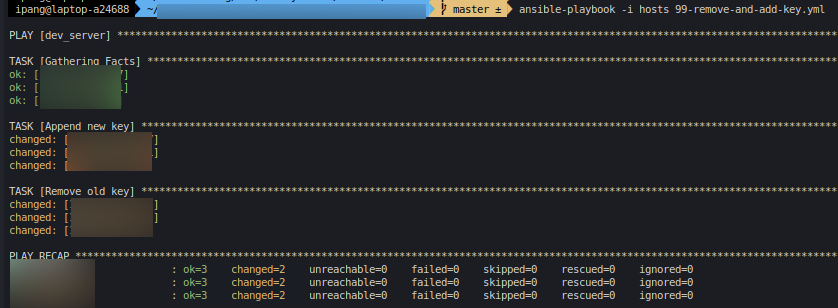
Add & Remove Pub Key Success
Notes:
- Bagaimana jika kamu mau menghapus beberapa key sekaligus
---
- hosts: server


  tasks:
  - name: Remove old key 1
    authorized_key:
      user: admin
      path: /home/admin/.ssh/authorized_keys
      state: absent
      key: "{{ lookup('file', '/home/ipang/.ssh/do/old_id_rsa1.pub') }}"

  - name: Remove old key 2
    authorized_key:
      user: admin
      path: /home/admin/.ssh/authorized_keys
      state: absent
      key: "{{ lookup('file', '/home/ipang/.ssh/do/old_id_rsa2.pub') }}"

  - name: Remove old key 3
    authorized_key:
      user: admin
      path: /home/admin/.ssh/authorized_keys
      state: absent
      key: "{{ lookup('file', '/home/ipang/.ssh/do/old_id_rsa3.pub') }}"
- Menghapus pub key beberapa user sekaligus? Bisa dengan 1 file yaml kalau kamu mengizinkan root login, jika tidak, lebih mudah membuat 2 file yaml terpisah
---
- hosts: server
   # remove-admin-key.yml
   # remove old key on admin
  tasks:
  - name: Remove old key 1
    authorized_key:
      user: admin
      path: /home/admin/.ssh/authorized_keys
      state: absent
      key: "{{ lookup('file', '/home/ipang/.ssh/do/old_id_rsa1.pub') }}"
Untuk user lain kamu bisa buat 1 file lagi
---
- hosts: server
   # remove-mimin-key.yml
   # remove old key on mimin
  tasks:
  - name: Remove old key 1
    authorized_key:
      user: mimin
      path: /home/mimin/.ssh/authorized_keys
      state: absent
      key: "{{ lookup('file', '/home/ipang/.ssh/do/old_mimin.pub') }}"