

Halo, kalau kamu merasa tulisan saya ngebantu kamu, kamu bisa ucapkan terima kasih lewat saweria.
If you feel this website help you, you can donate at saweria.
Problem
The client need simple app to check the log in realtime to debug their app (that have been containerized).
What I Used in This Tutorial
Docker version 24.0.6, build ed223bc
Ubuntu 22.04.3 LTS
How To
- Create
docker-compose.yml
version: "3,8"
services:
  dozzle:
    container_name: dozzle
    image: amir20/dozzle:latest
    volumes:
      - /var/run/docker.sock:/var/run/docker.sock
    ports:
      - 9999:8080
    environment:
      DOZZLE_NO_ANALYTICS: true
Run it using docker-compose up -d
- You can check at http://lcoalhost:9999
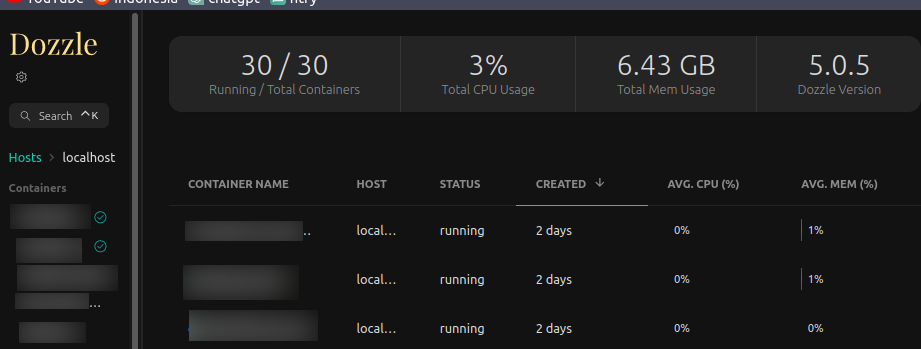
It Contain, All Container & Hardware Usage

Search Was Easy & Fast
Notes:
- If you want to serve Dozzle with sub path, use
version: "3,8"
services:
  dozzle:
    container_name: dozzle
    image: amir20/dozzle:latest
    volumes:
      - /var/run/docker.sock:/var/run/docker.sock
    ports:
      - 9999:8080
    environment:
      DOZZLE_NO_ANALYTICS: true
      DOZZLE_BASE: dozzle
Conclusion
It work on docker swarm mode but it doesn’t work on cluster
It has built-in basic auth option, but i prefer using basic auth on nginx. Because it was easier to setup fail2ban nginx-http-auth with it/
It fit for people who want to look their realtime log, not for you who want to keep their log forever (you can use Seq for this purpose)
Dozzle is a handy tool for monitoring your Docker container logs in real-time. With its simple setup and web interface, it provides an easy way to keep an eye on your containers and quickly identify any issues. Whether you’re running a single container or managing a fleet of them, Dozzle can be a valuable addition to your container management toolkit.
Reference: