

Halo, kalau kamu merasa tulisan saya ngebantu kamu, kamu bisa ucapkan terima kasih lewat saweria.
Hello, if you find this article helpful, you can express your gratitude through saweria.
How To
A. Deploy Redis Stack with default config
Create
docker-compose.ymlversion: "3.8" name: redis-stack services: redis-stack: container_name: redis-stack-ctr image: redis/redis-stack-server:latest restart: always environment: - REDIS_ARGS=--requirepass passwordRedisStack ports: - "6679:6379" networks: - redis-stack-net networks: redis-stack-net:
B. Deploy Redis Stack with exporter
Create
docker-compose.ymlversion: "3.8" name: redis-stack services: redis-stack: container_name: redis-stack-ctr image: redis/redis-stack-server:latest restart: always environment: - REDIS_ARGS=--requirepass passwordRedisStack ports: - "6379:6379" networks: - redis-stack-net redis-stack-exporter: image: oliver006/redis_exporter restart: unless-stopped depends_on: - redis-stack container_name: redis-stack-exporter-ctr ports: - 9121:9121 environment: REDIS_ADDR: redis://redis-stack:6379 REDIS_PASSWORD: passwordRedisStack networks: - redis-stack-net networks: redis-stack-net:
C. Deploy Redis Stack with custom config plus exporter
Create
docker-compose.ymlversion: "3.8" name: redis-stack services: redis-stack: container_name: redis-stack-ctr image: redis/redis-stack-server:latest restart: always environment: - REDIS_ARGS=--requirepass passwordRedisStack ports: - "6379:6379" volumes: - ./redis-stack.conf:/etc/redis-stack.conf #persistent db on redis-stack #default location was /var/lib/redis-stack - ./redis-stack:/var/lib/redis-stack command: "redis-stack-server /etc/redis-stack.conf" networks: - redis-stack-net redis-stack-exporter: image: oliver006/redis_exporter restart: unless-stopped depends_on: - redis-stack container_name: redis-stack-exporter-ctr ports: - 9121:9121 environment: REDIS_ADDR: redis://redis-stack:6379 REDIS_PASSWORD: passwordRedisStack networks: - redis-stack-net networks: redis-stack-net:Create
redis-stack.conffile at the same directory withdocker-compose.ymlfileport 6379 daemonize no requirepass passwordRedisStack maxmemory 64GB maxclients 1000000
It’s just a simple example config; you can check all available configs with config get * on your Redis instance.
If you cannot set some config (such as redisgears_2.execution-threads) because it immutable, you can put that config at redis-stack.conf
port 6379
daemonize no
requirepass passwordRedisStack
maxmemory 64GB
maxclients 1000000
redisgears_2.execution-threads 32
To set up Redis monitoring, you can check my other post, how to set up monitoring Redis with redis_exporter.
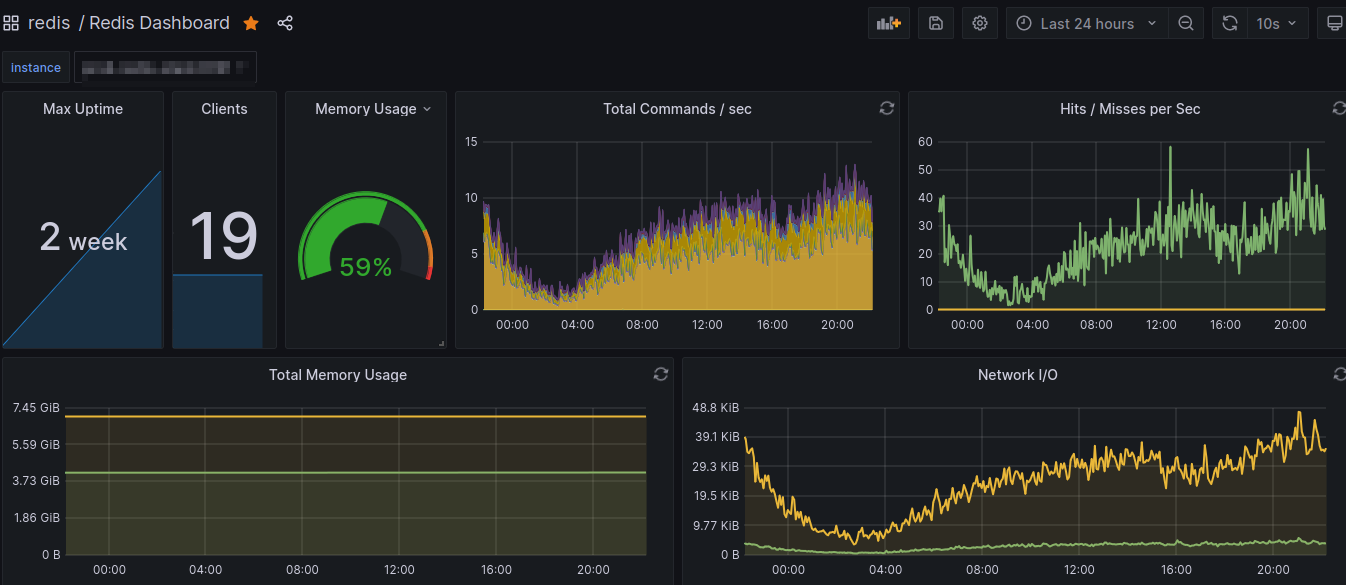
Redis Stack Monitoring Dashboard