

Halo, kalau kamu merasa tulisan saya ngebantu kamu, kamu bisa ucapkan terima kasih lewat saweria.
Hello, if you find this article helpful, you can express your gratitude through saweria.
Problem
I want to back up DigitalOcean Spaces Object Storage to Vultr Object Storage (or another cloud provider that provides Object Storage).
The tool that is right for this purpose is rclone, and I am using rclone v1.65.2 for this tutorial.
How To
First, configure our DigitalOcean Spaces on rclone using
rclone configand follow the instructions.It will create an rclone config file at
~/.config/rclone/rclone.conf, which will look like this:[do-spaces] type = s3 provider = DigitalOcean env_auth = false access_key_id = yourAccessKey secret_access_key = yourSecretKey endpoint = sgp1.digitaloceanspaces.com acl = privateTest it using
rclone ls do-spaces:orrclone lsd do-spaces:.Add a new alias to your Spaces bucket:
[do-spaces] type = s3 provider = DigitalOcean env_auth = false access_key_id = yourAccessKey secret_access_key = yourSecretKey endpoint = sgp1.digitaloceanspaces.com acl = private [do-bucket-name] type = alias remote = do-spaces:bucket-name/Test it using
rclone ls bucket-name.Set up Vultr Object Storage on rclone by adding this line to
~/.config/rclone/rclone.conf:[vultr-object] type = s3 provider = Other env_auth = false access_key_id = yourAccessKey secret_access_key = yourSecretKey endpoint = https://sgp1.vultrobjects.com acl = private [vultr-bucket-name] type = alias remote = vultr-object:bucket-name/
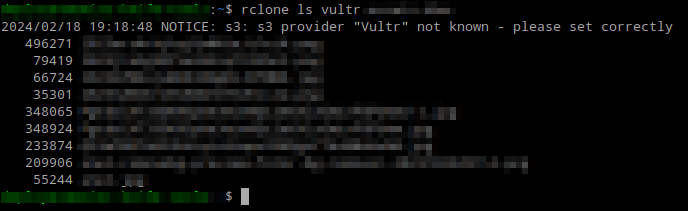
Fill Provider with ‘Other’ than ‘Vultr’ To Remove Warning
To back up all data from DigitalOcean Spaces to Vultr Object Storage, use
rclone sync do-bucket-name: vultr-bucket-name:. If you are not sure, you can add--dry-runto test the sync:#rclone sync source:path dest:path rclone sync --dry-run do-bucket-name: vultr-bucket-name:

Run rclone sync --dry-run
Notes:
You can check all available paramater/flags with
rclone --helpIf you first
rclone syncfailed, just try to sync again. Sometimes it happen when your bucket have a lot of data

Run Try To Re-run rclone sync