

Halo, kalau kamu merasa tulisan saya ngebantu kamu, kamu bisa ucapkan terima kasih lewat saweria.
Hello, if you find this article helpful, you can express your gratitude through saweria.
How To
Install php-opcache extension
sudo apt install php8.0-opcacheJika kamu pake php-fpm settingan php.ini terletak di
/etc/php/8.0/fpm/php.ini. Jika kamu tidak menggunakan php-fpm (kasus nya kamu pake Laravel Octane), file setting terletak di/etc/php/8.0/cli/php.iniGanti beberapa value opcache
opcache.enable=1

opcache.enable_cli=0

opcache.memory_consumption=512

opcache.interned_strings_buffer=64

opcache.max_accelerated_files=50000

opcache.max_wasted_percentage=15

opcache.validate_timestamps=0

opcache.revalidate_freq=200

opcache.save_comments=1

opcache.mmap_base=0x20000000
Restart service php,
sudo service php8.0-fpm restartUntuk mengecek settingan Opcache, kita bisa gunakan CacheTool
curl -sLO https://github.com/gordalina/cachetool/releases/latest/download/cachetool.phar
chmod +x cachetool.phar
mv cachetool.phar cachetool
sudo mv cachetool /usr/bin/
Untuk menggunakan CacheTool, jalankan
sudo php ./cachetool.phar opcache:status --fcgi=/var/run/php/php8.0-fpm.sock
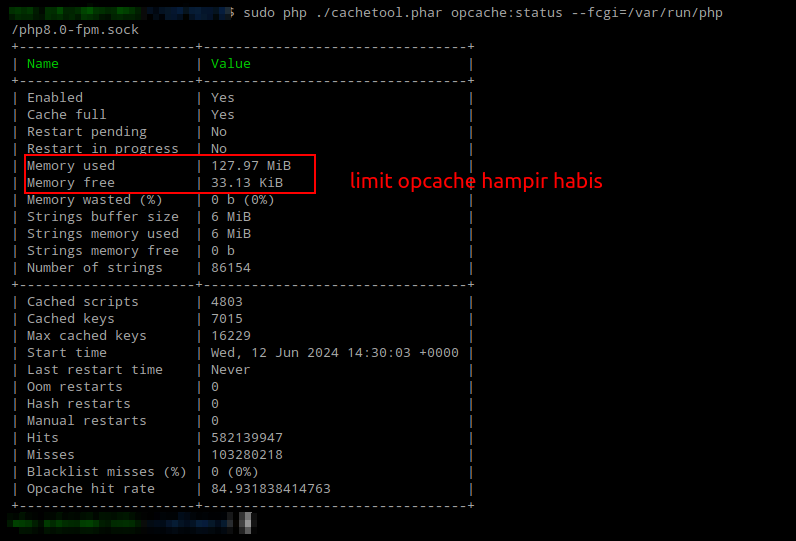
Setup Opcache Default
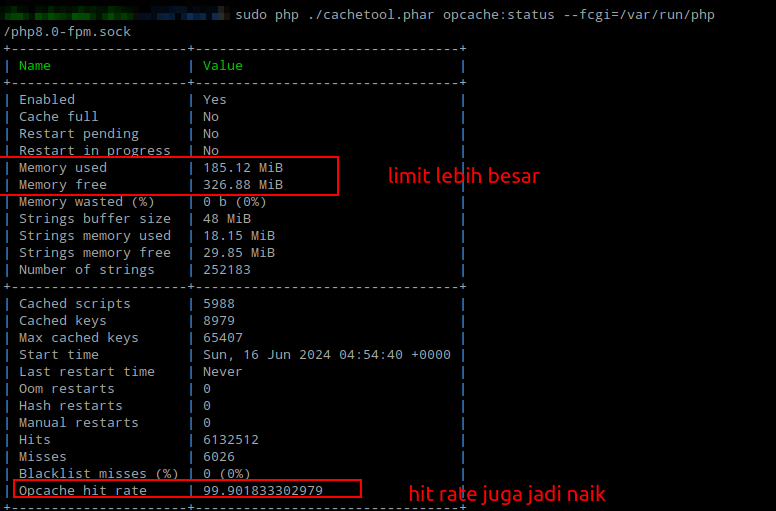
Setup Opcache Production
Tambahan
CacheTool usefull command
Check opcache status,
php /usr/bin/cachetool opcache:status --fcgi=/var/run/php/php8.0-fpm.sockReset/clear opcache,
php /usr/bin/cachetool opcache:reset --fcgi=/var/run/php/php8.0-fpm.sockCheck opcache config
php /usr/bin/cachetool opcache:configuration --fcgi=/var/run/php/php8.0-fpm.sock
Referensi: